<?xml version="1.0" encoding="utf-8"?>
<feed xmlns="http://www.w3.org/2005/Atom" xmlns:media="http://search.yahoo.com/mrss/">
    <title>Shanes Lab</title>
    <link href="https://shanes-lab.com/feed.xml" rel="self" />
    <link href="https://shanes-lab.com" />
    <updated>2026-04-13T12:04:14-06:00</updated>
    <author>
        <name>Shane Cooper</name>
    </author>
    <id>https://shanes-lab.com</id>

    <entry>
        <title>SNI - NGINX and TLM Agent</title>
        <author>
            <name>Shane Cooper</name>
        </author>
        <link href="https://shanes-lab.com/sni-nginx-and-tlm-agent.html"/>
        <id>https://shanes-lab.com/sni-nginx-and-tlm-agent.html</id>

        <updated>2026-04-13T09:30:11-06:00</updated>
            <summary type="html">
                <![CDATA[
                    I've been testing more TLM agent discovery and processing as it relates to multiple domains bound to one IP address, or SNI. Environment: I have a server with services I'd like to expose using a public facing domain (FQDN) with several layers of authentication to&hellip;
                ]]>
            </summary>
        <content type="html">
            <![CDATA[
                <p>I've been testing more TLM agent discovery and processing as it relates to multiple domains bound to one IP address, or SNI.</p>
<p>Environment:<br>I have a server with services I'd like to expose using a public facing domain (FQDN) with several layers of authentication to protect the sites from outside eyes and potentially creating an attack surface.</p>
<p>My home lab and network setup:</p>
<ol>
<li>1GB fiber to the house with single external IP address</li>
<li>Edge Reverse Proxy - configured to ingest external requests and pass them along to internal servers. I terminate :80 at this server and return a 301 to force any :80 requests up to :443 -&gt; which then sends the traffic as TLM passthrough.</li>
<li>Solution servers - I have several that are external facing and terminate the TLS traffic passed along through the edge reverse proxy server. This is where all the work is done.</li>
</ol>
<p>While not exposing all the details, one of my "solution servers" is a PlexMediaServer where I run a few automation tools for streamlining media gathering for presentation through my Plex server for our personal enjoyment.</p>
<p>I'm running the following setup on my PlexMediaServer</p>
<ul>
<li><strong>PlexMediaServer</strong> - native to Ubuntu Linux</li>
<li><strong>Seerr </strong>- for requesting TV shows and/or Movies - we make the request, it determines what's available and when, then sends the actual management to:</li>
<li><strong>Radarr and/or Sonarr</strong> - Radarr handles movies and Sonarr handles TV series for tracking against various RSS feeds and Indexers. These two services then push the download request to:</li>
<li><strong>qBittorrent</strong> - which handles the actual downloading and seeding. Sonarr or Radarr monitor the download status and maintain the system of record for what's managed on my Plex server.</li>
</ul>
<p>What makes this setup unique is... all of these services (Seerr, Sonarr, Radarr), except for Plex itself are running a Docker Containers. Each service is bound to specific ports (which are configurable, but need to be unique). In my case, I left them default.</p>
<p>On the PlexMediaServer - I installed NGINX and configured each sever block to capture incoming TLS requests for the respective service AND reverse proxied it to the respective docker container port - boom!</p>
<p>This is where TLM came into play. I installed a TLM agent tied to my demo/test portal in production. Had it scan local bindings and all certs. Found way more than I was expecting, but initially it found the wrong IP with single vhost cert that I'd bootstrapped with OpenSSL.</p>
<p>Another note: I had installed Tailscale some time back to access this server remote through my private VPN tool, Tailscale. Which worked "ok" - but resolution for my two primary users (Wife &amp; MIL) to pick shows/movies - was clunky. Hence, adding these to public FQDNs.</p>
<p>First scan by TLM found a single cert bound to a 10.x network, which was where Tailscale lived/bound itself. I then declared specific IP address for each server block on NGINX (I have 3). TLM didn't see the specific IP server blocks.</p>
<p>WHERE THE RUBBER MEETS THE ROAD!<br>One shortcoming of setting up a new TLM agent is, SNI is not enabled. After first scan, if SNI is expected and not displayed, then it needs to be enabled and declared.</p>
<p>Some issues with SNI:</p>
<ul>
<li>If all FQDNs server blocks are bound to specific IP and it's the SAME IP, first scan will only show first vHost on the nginx.conf file and will fail to see the other FQDNs</li>
<li>If server blocks are set to just listen on :443 - it will bind to first IP bound in stack, so best practice is consider declaring the IP in the server block. x.x.x.x:443 will insure the FQDN listens JUST on that IP.</li>
<li>Once first scan is done, click into the TLM Agent and set SNI to enable. AND declare the specific FQDNs expected. Declare what's configured. TLM will not "discover" these.</li>
<li>Another "oddity" if you have N+1 FQDNS, often time during automation configuration, the second or third FQDN may fail the last step in automation "test" - I've learned two things. Hit "Retry" once and if it fails again, test it manually and/or check the server block configuration to see if the "Digicert managed" cert was updated. If so, you may have to restart NGINX. My best guess is, TLM agent either skipped restarting NGINX or it failed getting the right cert. Dropping to CLI and manually restarting it will sometimes get it reset.</li>
</ul>
<p>Now - in my case, all three FQDNs have quality public certificates issued and presenting the three services I have available. TLM is managing these and I've established automation for each of these certificates and will monitor.</p>
            ]]>
        </content>
    </entry>
    <entry>
        <title>YubiKey - experiment 1</title>
        <author>
            <name>Shane Cooper</name>
        </author>
        <link href="https://shanes-lab.com/yubikey-experiment-1.html"/>
        <id>https://shanes-lab.com/yubikey-experiment-1.html</id>

        <updated>2026-04-11T07:51:47-06:00</updated>
            <summary type="html">
                <![CDATA[
                    First foray into installing and testing a Yubikey with 1Password = FAIL! I've acquired (2) Yubikeys - one for primary use and another for backup in case the first one is lost, gets damaged or just stops working. What is a Yubikey? -&gt; It's a&hellip;
                ]]>
            </summary>
        <content type="html">
            <![CDATA[
                <p> </p>
<p>First foray into installing and testing a Yubikey with 1Password = FAIL!</p>
<p>I've acquired (2) Yubikeys - one for primary use and another for backup in case the first one is lost, gets damaged or just stops working.</p>
<p>What is a Yubikey? -&gt; It's a hardware token device that is designed for several functions. Onboard, it has the ability to:</p>
<ol>
<li>Be a second factor during login on various accounts. Think authenticator app, but with a device. When you log into say your email account, enter a password, the second factor or (2FA) Two-Factor-Authentication - is the Yubikey.</li>
<li>Specifically built certificates can be added to the key in a specific partition designed to house certificates. This use case is for specific access for devices, networks, VPNs and/or anything that needs a unique identifier to validate the user is supposed to have access. Think - company badge that opens a door, but then you need a Yubikey with a unique identifier to define if this person can access this specific door. Certificates can be changed vs hard coded badges can not, which is why hardware tokens or Yubikeys are useful.</li>
<li>Passkeys - a newer authentication option that actually replaces passwords - it's a little more nuanced than 2FA or certificates and is stored on a specific area of the Yubikey. These are more tricky and frankly, problematic.</li>
</ol>
<p>Now, lets get to the specific use case as a "newbie". All I wanted to do was setup my 1Password account to use a second authentication method or 2FA.</p>
<ol style="list-style-type: lower-alpha;">
<li>I have a Yubikey that i've setup (I think anyway) and established the PIN, PUK and Password to protect the key in case it physically gets out of my control. Yep, another password and PIN to remember. Sigh!</li>
<li>I have a 1Password account that does not have 2FA enabled. I should, but haven't set it up because I use 1Password as my "authenticator" app for everything else. So, to setup 1Password with 2FA it'd be a cyclical thing to sign into 1Password to create the authenticator code to, well, log into 1Password. I've tried and it kinda breaks - sorta. Another story, but suffice it to say, enabling 2FA for 1Password is tricky.</li>
</ol>
<p>So, my thinking was, if I want to take advantage of 2FA for 1Password without setting up another authenticator app, a hardware token, AKA - Yubikey, would do the trick. That was my thinking anyway, but not as easy as it sounds.</p>
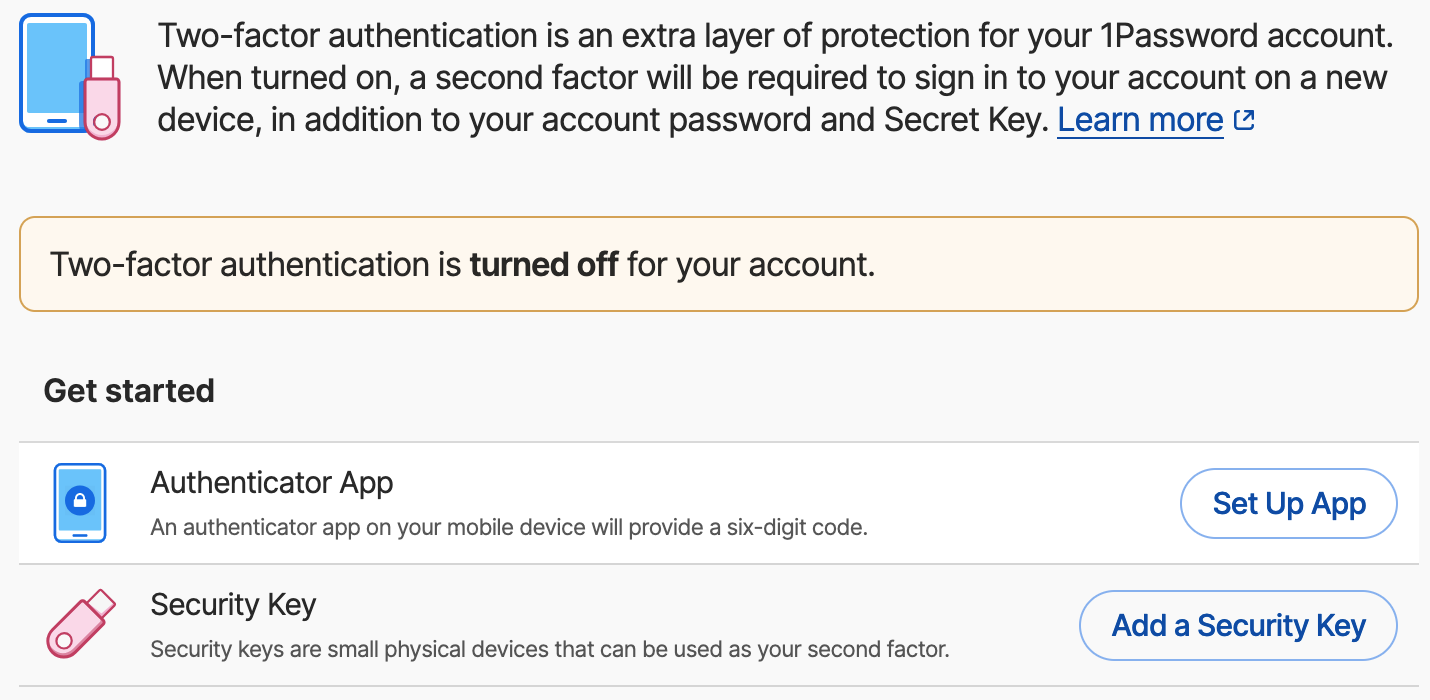
<p>To get started, I pulled up the 1Password documentation and quickly read through to get the general gist. Enable 2FA using a Security Key or Hardware Token, say yes to a few prompts and voila'.</p>
<figure class="post__image"><img loading="lazy"  src="https://shanes-lab.com/media/posts/4/Screenshot-2026-04-12-at-7.15.45-AM.png" alt="" width="1430" height="700" sizes="(max-width: 1920px) 100vw, 1920px" srcset="https://shanes-lab.com/media/posts/4/responsive/Screenshot-2026-04-12-at-7.15.45-AM-xs.png 640w ,https://shanes-lab.com/media/posts/4/responsive/Screenshot-2026-04-12-at-7.15.45-AM-sm.png 768w ,https://shanes-lab.com/media/posts/4/responsive/Screenshot-2026-04-12-at-7.15.45-AM-md.png 1024w ,https://shanes-lab.com/media/posts/4/responsive/Screenshot-2026-04-12-at-7.15.45-AM-lg.png 1366w ,https://shanes-lab.com/media/posts/4/responsive/Screenshot-2026-04-12-at-7.15.45-AM-xl.png 1600w ,https://shanes-lab.com/media/posts/4/responsive/Screenshot-2026-04-12-at-7.15.45-AM-2xl.png 1920w"></figure>
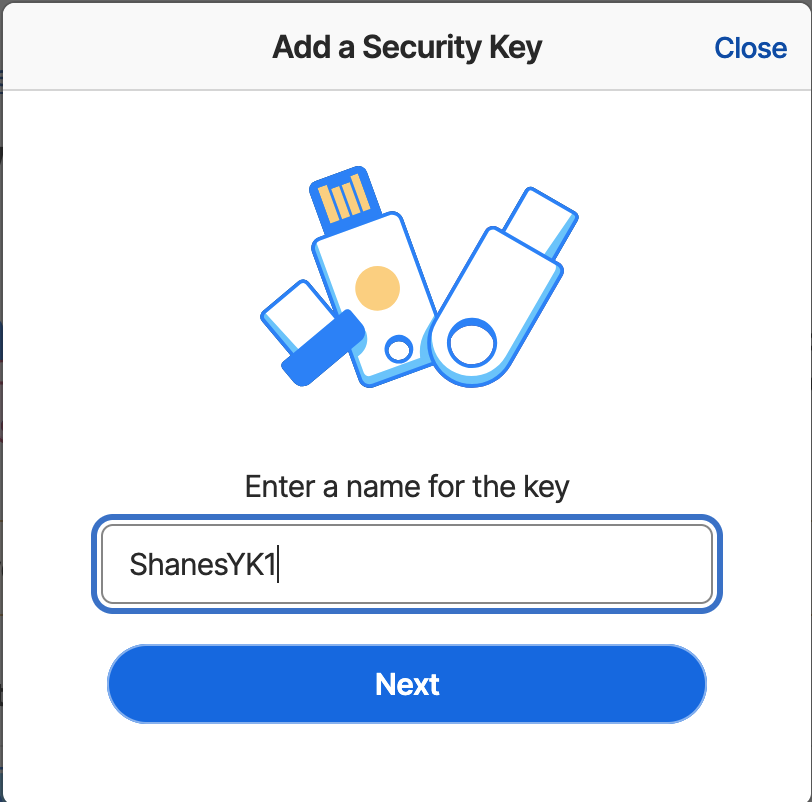
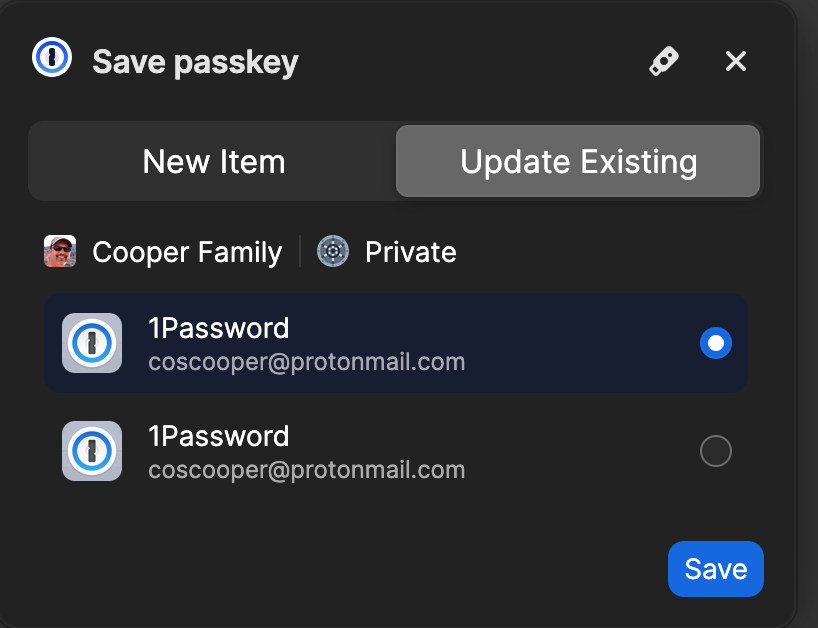
<p>I selected "Add a Security Key" and was prompted to approve my "passkey" - huh?! - that was my first indication that something was amiss because that's not exactly what I was expecting.</p>
<figure class="post__image"><img  src="https://shanes-lab.com/media/posts/4/Screenshot-2026-04-12-at-7.17.19-AM.png" alt="" width="261" height="528" sizes="(max-width: 1920px) 100vw, 1920px" srcset="https://shanes-lab.com/media/posts/4/responsive/Screenshot-2026-04-12-at-7.17.19-AM-xs.png 640w ,https://shanes-lab.com/media/posts/4/responsive/Screenshot-2026-04-12-at-7.17.19-AM-sm.png 768w ,https://shanes-lab.com/media/posts/4/responsive/Screenshot-2026-04-12-at-7.17.19-AM-md.png 1024w ,https://shanes-lab.com/media/posts/4/responsive/Screenshot-2026-04-12-at-7.17.19-AM-lg.png 1366w ,https://shanes-lab.com/media/posts/4/responsive/Screenshot-2026-04-12-at-7.17.19-AM-xl.png 1600w ,https://shanes-lab.com/media/posts/4/responsive/Screenshot-2026-04-12-at-7.17.19-AM-2xl.png 1920w"></figure><figure class="post__image"><img loading="lazy"  style="font-size: inherit;" src="https://shanes-lab.com/media/posts/4/Screenshot-2026-04-12-at-7.18.01-AM.png" alt="" width="361" height="277" sizes="(max-width: 1920px) 100vw, 1920px" srcset="https://shanes-lab.com/media/posts/4/responsive/Screenshot-2026-04-12-at-7.18.01-AM-xs.png 640w ,https://shanes-lab.com/media/posts/4/responsive/Screenshot-2026-04-12-at-7.18.01-AM-sm.png 768w ,https://shanes-lab.com/media/posts/4/responsive/Screenshot-2026-04-12-at-7.18.01-AM-md.png 1024w ,https://shanes-lab.com/media/posts/4/responsive/Screenshot-2026-04-12-at-7.18.01-AM-lg.png 1366w ,https://shanes-lab.com/media/posts/4/responsive/Screenshot-2026-04-12-at-7.18.01-AM-xl.png 1600w ,https://shanes-lab.com/media/posts/4/responsive/Screenshot-2026-04-12-at-7.18.01-AM-2xl.png 1920w"></figure>
<p> </p>
<p>So - moving along, I hit save to the Passkey - which basically saved it back into 1Password - weird. (I actually failed at this point - because the documentation clearly said click on the little USB icon on the top right, NOT hit save) - but acting like a general user, the most obvious was to just hit save. Which - I did.</p>
<p>It just went south from there. The screen showed to "activate" my Yubikey and while the key was in the USB slot - nothing happened. Sigh!</p>
<p>Looking at my phone, I noticed a similar screen displaying and said to insert my Yubikey on my phone or near the top if it has NFC - which I pulled the Yubikey from my Macs USB slot, placed it near the top of the phone. Surely this would take.</p>
<p>Nope - it got stuck in some looping hell. A notification popped up saying, "Use Yubikey Authenticator App" - uh, yes please.</p>
<p>My iPhone launched the Yubikey Authenticator app and... well, nothing happened. More sighing insued!</p>
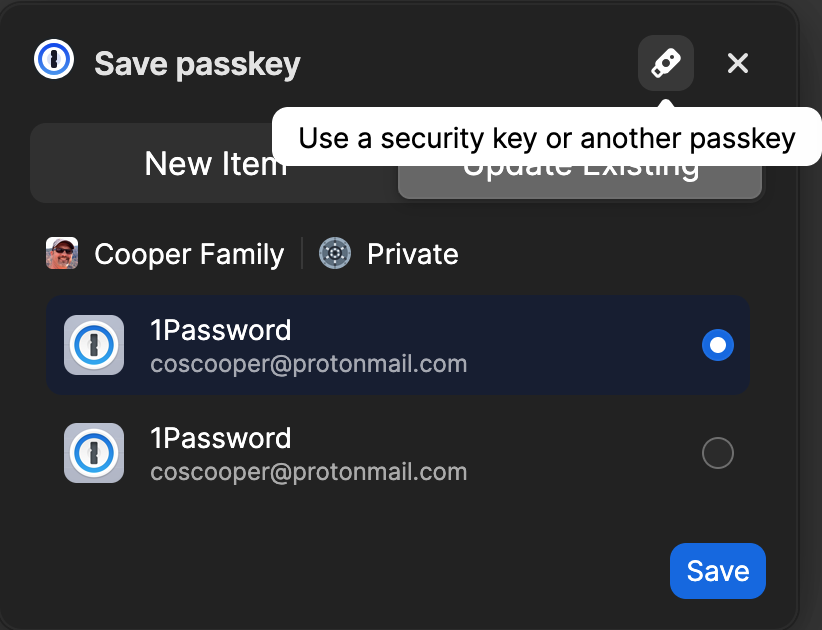
<p>Back on my Mac and on the Setup page for 1Passwords two-factor authentication page, I selected disable 2FA so as to not create a mess. Figured I'd start over and see if I missed something. Of course I did... the save the passkey to the little device icon, NOT 1Password.</p>
<p>STARTED OVER:</p>
<p>My second run was a little more promising, but it failed as well. The second time I selected the little USB stick icon.</p>
<figure class="post__image"><img loading="lazy"  src="https://shanes-lab.com/media/posts/4/Screenshot-2026-04-12-at-7.19.30-AM.png" alt="" width="243" height="339" sizes="(max-width: 1920px) 100vw, 1920px" srcset="https://shanes-lab.com/media/posts/4/responsive/Screenshot-2026-04-12-at-7.19.30-AM-xs.png 640w ,https://shanes-lab.com/media/posts/4/responsive/Screenshot-2026-04-12-at-7.19.30-AM-sm.png 768w ,https://shanes-lab.com/media/posts/4/responsive/Screenshot-2026-04-12-at-7.19.30-AM-md.png 1024w ,https://shanes-lab.com/media/posts/4/responsive/Screenshot-2026-04-12-at-7.19.30-AM-lg.png 1366w ,https://shanes-lab.com/media/posts/4/responsive/Screenshot-2026-04-12-at-7.19.30-AM-xl.png 1600w ,https://shanes-lab.com/media/posts/4/responsive/Screenshot-2026-04-12-at-7.19.30-AM-2xl.png 1920w"></figure>
<figure class="post__image">... <span style="font-size: inherit;">and was prompted with this message - YEAH! </span><img loading="lazy"  style="font-size: inherit;" src="https://shanes-lab.com/media/posts/4/Screenshot-2026-04-12-at-7.19.55-AM.png" alt="" width="200" height="115" sizes="(max-width: 1920px) 100vw, 1920px" srcset="https://shanes-lab.com/media/posts/4/responsive/Screenshot-2026-04-12-at-7.19.55-AM-xs.png 640w ,https://shanes-lab.com/media/posts/4/responsive/Screenshot-2026-04-12-at-7.19.55-AM-sm.png 768w ,https://shanes-lab.com/media/posts/4/responsive/Screenshot-2026-04-12-at-7.19.55-AM-md.png 1024w ,https://shanes-lab.com/media/posts/4/responsive/Screenshot-2026-04-12-at-7.19.55-AM-lg.png 1366w ,https://shanes-lab.com/media/posts/4/responsive/Screenshot-2026-04-12-at-7.19.55-AM-xl.png 1600w ,https://shanes-lab.com/media/posts/4/responsive/Screenshot-2026-04-12-at-7.19.55-AM-2xl.png 1920w"></figure>
<p>My first thought was it should have prompted me for my PIN or PUK given I'd set it up with the Yubico Authenticator application and that maybe it'd just needed me to unlock it on the device.</p>
<p>I went back over to the Yubico Authenticator app and selected Passkey - attempted to unlock the FIDO2 section - what ever that is - and it failed to take my PIN. More sighing! I use a pretty standard PIN coding system - yeah, i know, not supposed to use same passwords/pins etc... but when you live in a login to many things world on a daily basis (I once tracked on any given day, I actually can log into, enter a pin/password or place my thumb on my biometric reader on my Mac - like over 300 times any given day - yikes) - So, I have to use something familiar.</p>
<p>No combination would work... sighing switched to cursing and GRRRRRR.... WTF!?</p>
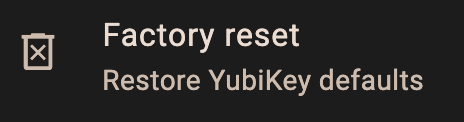
<p>Considering I'd not used this device for anything yet, I noticed the "Factory reset" button. Maybe I'd slipped during the PIN entry phase and figured I'd just start over from scratch. More sighing.</p>
<figure class="post__image"><img loading="lazy"  src="https://shanes-lab.com/media/posts/4/Screenshot-2026-04-12-at-7.31.05-AM.png" alt="" width="464" height="122" sizes="(max-width: 1920px) 100vw, 1920px" srcset="https://shanes-lab.com/media/posts/4/responsive/Screenshot-2026-04-12-at-7.31.05-AM-xs.png 640w ,https://shanes-lab.com/media/posts/4/responsive/Screenshot-2026-04-12-at-7.31.05-AM-sm.png 768w ,https://shanes-lab.com/media/posts/4/responsive/Screenshot-2026-04-12-at-7.31.05-AM-md.png 1024w ,https://shanes-lab.com/media/posts/4/responsive/Screenshot-2026-04-12-at-7.31.05-AM-lg.png 1366w ,https://shanes-lab.com/media/posts/4/responsive/Screenshot-2026-04-12-at-7.31.05-AM-xl.png 1600w ,https://shanes-lab.com/media/posts/4/responsive/Screenshot-2026-04-12-at-7.31.05-AM-2xl.png 1920w"></figure>
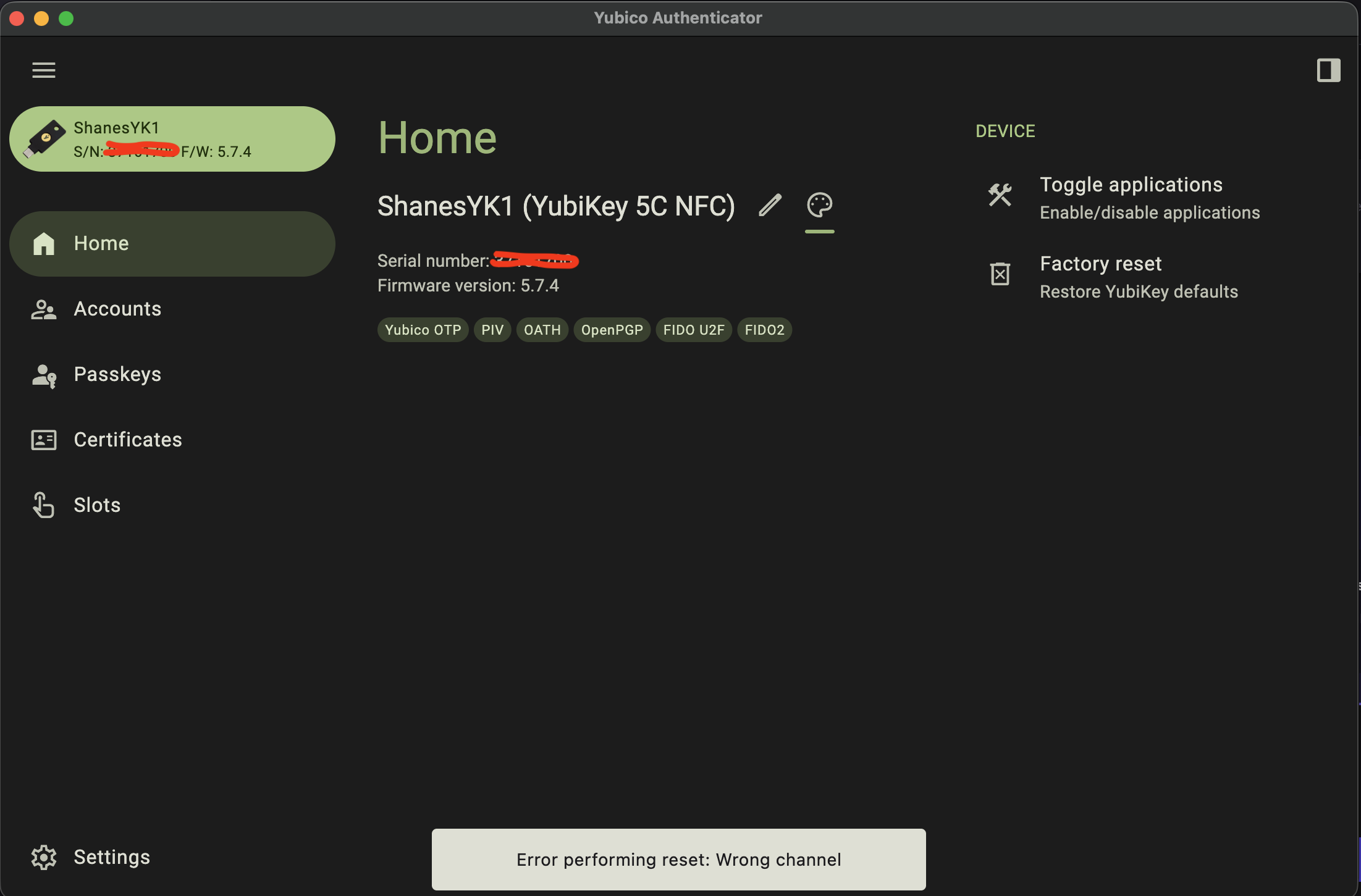
<p>This is where it went off the rails again.</p>
<figure class="post__image"><img loading="lazy"  src="https://shanes-lab.com/media/posts/4/Screenshot-2026-04-11-at-4.37.42-PM-2.png" alt="" width="2203" height="1451" sizes="(max-width: 1920px) 100vw, 1920px" srcset="https://shanes-lab.com/media/posts/4/responsive/Screenshot-2026-04-11-at-4.37.42-PM-2-xs.png 640w ,https://shanes-lab.com/media/posts/4/responsive/Screenshot-2026-04-11-at-4.37.42-PM-2-sm.png 768w ,https://shanes-lab.com/media/posts/4/responsive/Screenshot-2026-04-11-at-4.37.42-PM-2-md.png 1024w ,https://shanes-lab.com/media/posts/4/responsive/Screenshot-2026-04-11-at-4.37.42-PM-2-lg.png 1366w ,https://shanes-lab.com/media/posts/4/responsive/Screenshot-2026-04-11-at-4.37.42-PM-2-xl.png 1600w ,https://shanes-lab.com/media/posts/4/responsive/Screenshot-2026-04-11-at-4.37.42-PM-2-2xl.png 1920w"></figure>
<p>I tried 3 or 4 times and continued to get this error.</p>
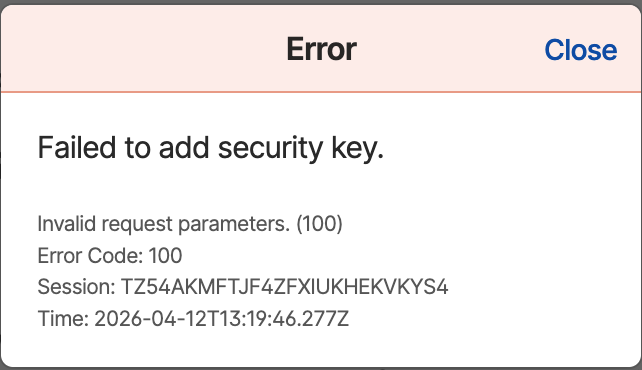
<p>I then popped over the Yubikeys support site, entered a support request, sent them my notes, included this screen shot and am waiting to hear back as to why this failed. I mean, factory reset means wipe the device and start over. But, apparently, when you select FIDO2, it fails.</p>
<p>Here's where I as a "casual" user who just wanted to use this hardware token device for 2FA on one of the most important aspects of my daily tools, my main password manager -&gt; it's been an abismal failure. Yes, initially it was my fault for not reading for comprehension and/or failing to follow instructions, but once I got on track, it still failed all over the place.</p>
<p>While I'm fairly technical and specifically work in the PKI space - I work for the largest Certificate Authority on the planet, using a Yubikey is NOT for the faint of heart or the "casual" user.</p>
<p>I'm struggling and can't imagine a novice or casual user would have any better luck than I have with this device.</p>
<p>Stay tuned as I figure out how to use it for other applications.</p>
<p> </p>
            ]]>
        </content>
    </entry>
    <entry>
        <title>Home Lab</title>
        <author>
            <name>Shane Cooper</name>
        </author>
        <link href="https://shanes-lab.com/home.html"/>
        <id>https://shanes-lab.com/home.html</id>

        <updated>2026-04-08T16:24:31-06:00</updated>
            <summary type="html">
                <![CDATA[
                    Having a home lab or server to handle both home server and test lab needs is both a luxury and a curse. It's a luxury as I can host just about anything I think I'm capable, which usually means a complex set of Ubuntu linux&hellip;
                ]]>
            </summary>
        <content type="html">
            <![CDATA[
                <p>Having a home lab or server to handle both home server and test lab needs is both a luxury and a curse. It's a luxury as I can host just about anything I think I'm capable, which usually means a complex set of Ubuntu linux systems or windows servers to service a specific need. The curse is, I tend to set them up "in the moment" and forget the complex web of configuration, code or setup and of course like most techs flying too close to the sun, I do not document.</p>
<p>So, this site is NOT intended to be my "documentation" per se, but I do hope to use it to document different test procedures, technology or the like.</p>
<p>What is my home lab? I do NOT plan to expose any of the details, like access, IP address, acct credentials or anything that would point a bad actor towards a path inside my home network - THAT would be both crazy and counterintuative to my own career focus, cybersecutiry professional.</p>
<p>My home lab basically consists of the following:</p>
<ul>
<li>Dell 650 server - 128gb RAM, 8CPUs and 8 drive slots for SSD drive storage.</li>
<li>ProxMox - running on bare metal</li>
<li>Lots of VMs - most for testing PKI automation, development, coding, new server technology, dockers etc...</li>
<li>PiHole - a VM</li>
<li>Plex - a VM</li>
</ul>
<p>That's the foundation of my entire system.</p>
            ]]>
        </content>
    </entry>
</feed>